
Introduction: Your Second Chance at Education
Life has a funny way of interrupting our plans. Maybe you couldn’t continue your education after Matric because your family needed you to work. Perhaps marriage and children took priority over that degree you always wanted. Or maybe you simply lost your way for a while and now you’re ready to get back on track.
Whatever your story, here’s the truth: it’s never too late.
Allama Iqbal Open University (AIOU) stands as Pakistan’s biggest blessing for millions who thought their educational journey had ended. With over one million students enrolled across the country, AIOU has mastered the art of making education accessible to everyone regardless of age, location, or life circumstances .
The beautiful thing about AIOU is that education comes to you. No need to quit your job. No need to leave your family. No need to rearrange your entire life. You simply apply online, receive your study materials at home, learn at your own pace, and appear for exams when you’re ready .
And right now, Spring 2026 admissions are officially open.
This guide will walk you through every single step of the AIOU online admission form. No complicated jargon. No confusing technical terms. Just pure, simple instructions that anyone can follow.
Let’s turn that “what if” into “what is.”
AIOU Online Admission Form
👉 AIOU Admission Portal for Fresh Students
Why AIOU? Understanding Your Best Option
Before jumping into the application process, let’s understand why millions choose AIOU every year.
Flexibility That Fits Your Life
AIOU operates on a distance learning model. You receive books and study materials at your home address. You can study at 3 AM or 3 PM – whenever life gives you a quiet moment. Workshops and exams happen at regional centers near your city, so you don’t travel far .
Recognized and Accredited
All AIOU degrees are recognized by the Higher Education Commission (HEC) of Pakistan and the government. Whether you’re aiming for a government job or planning further studies, your AIOU degree carries full weight .
Affordable for Everyone
Compared to traditional universities, AIOU fees are remarkably low. A Matric semester costs around Rs. 4,600 . You can even pay in installments through the semester’s fee structure.
No Upper Age Limit
Whether you’re 18 or 80, AIOU welcomes you. Education has no retirement age here .
Wide Program Range
From Matriculation to PhD, from teacher training to technical courses, AIOU offers something for everyone .
AIOU Online Admission Advertisement 2026
👉 AIOU Admission Admission Advertisement
AIOU Online Admission Form Spring 2026: Important Dates to Remember
Mark these dates on your calendar right now. Missing the deadline means waiting another six months for the next cycle.
| Program Category | Last Date for Submission |
|---|---|
| Matric to MS Programs | February 10, 2026 |
| PhD Programs | February 17, 2026 |
Some programs follow a phased admission system. Teacher training programs and certain bachelor’s degrees may remain open until April 1, 2026 . However, don’t rely on extended dates. Submit your application at least one week before any deadline to avoid last-minute server issues or bank delays .
Before You Begin: Gather These Documents
Smart preparation saves time. Take fifteen minutes to collect everything below before opening the website.
Essential Items Checklist:
| Item | Details |
|---|---|
| CNIC or B-Form | Original and scanned copy (front and back) |
| Passport-size photographs | 4 copies with plain blue background – professional quality only |
| Previous educational certificates | Scanned copies of all relevant degrees |
| Domicile certificate | If applying for reserved seats or specific programs |
| Working mobile number | For OTP verification and SMS updates |
| Active email address | Gmail preferred for admission confirmations |
Fee Estimate (First Semester):
- Matric (SSC): Approximately Rs. 4,600 – 5,000
- FA/I.Com: Approximately Rs. 5,000 – 6,000
- BA/Associate Degree: Approximately Rs. 6,000 – 8,000
- BS/BBA Programs: Approximately Rs. 16,000 – 20,000
- B.Ed Programs: Approximately Rs. 16,000 – 22,000
Keep some extra cash for bank charges if paying manually at a branch .
Step 1: Access the Official Admission Portal
Open your preferred browser and navigate to:
🔗 https://fmbp.aiou.edu.pk/application/index.php
Important Warning: There are fake websites pretending to be AIOU portals. Always type the URL manually or use an official bookmark. Never click random Google ads or Facebook links claiming simplified admission .
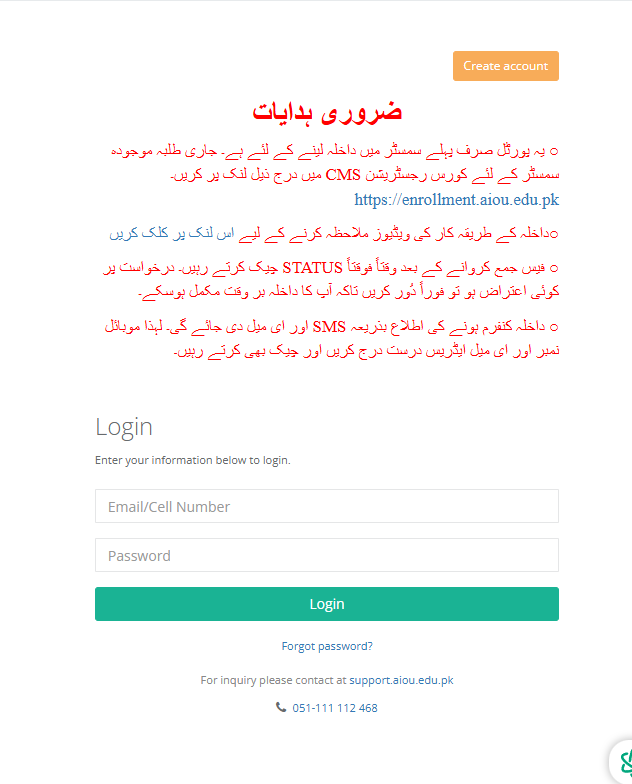
Step 2: Create Your Account
If you’re new to AIOU, you need to register first.
New User Registration Process:
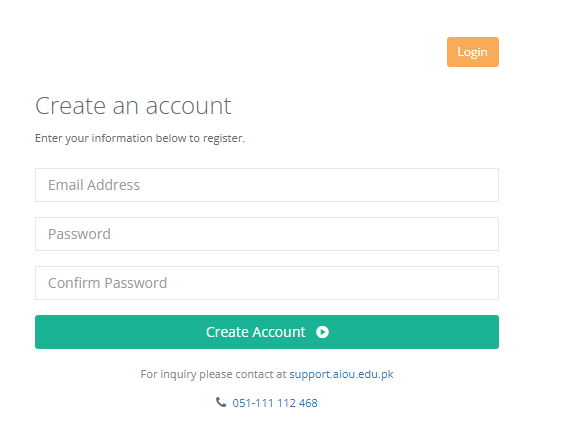
- On the login page, locate and click “Create an account”
- Fill in the following:
- Valid email address (double-check for typos)
- Strong password (mix of letters, numbers, special characters)
- Confirm password
- Click the submit button
- Open your email inbox (check spam folder too)
- Click the verification link sent by AIOU
Already Have an Account?
Simply enter your registered email/cell number and password, then click Login.
Step 3: Navigate Your Dashboard
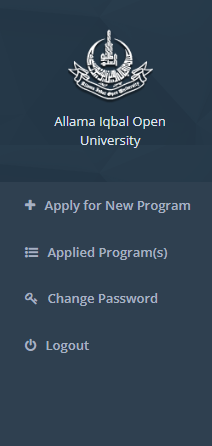
After successful login, you’ll see a clean dashboard with four main options:
- + Apply for New Program – Start a fresh admission application
- = Applied Program(s) – Check status of existing applications
- 🔑 Change Password – Update your login credentials
- 🔄 Logout – Exit the system
Click the “+ Apply for New Program” button to begin your admission journey.
Step 4: Choose Your Learning Mode
AIOU presents two distinct paths:
Option 1: Face To Face Program(s)
This option is for regular on-campus classes held at AIOU’s main campus in Islamabad or regional campuses. Choose this if you can attend physical classes daily and prefer traditional classroom interaction .
Option 2: Open Distance Learning Program(s)
This is the classic AIOU experience. You study from home using printed books and online resources. Workshops occur occasionally at regional centers. Most applicants should select this option unless applying for specific research programs requiring lab presence .
Make your selection carefully. This choice determines your entire study experience.

Step 5: Browse Available Programs
After selecting your preferred mode, the system displays a comprehensive table of available programs.
For Open Distance Learning, you’ll see options like:
| S.# | Program Name | Session | Deadline | Action |
|---|---|---|---|---|
| 1 | ODL – SSC/E-SKILL COURSES | Spring 2026 | March 30, 2026 | Check Eligibility |
| 2 | ODL – HSSC | Spring 2026 | March 30, 2026 | Check Eligibility |
| 3 | ODL – BA/AD & BS/B.ED/BBA (4 YEARS) | Spring 2026 | March 30, 2026 | Check Eligibility |
| 4 | ODL – B.ED (1.5 YEARS) | Spring 2026 | March 30, 2026 | Check Eligibility |
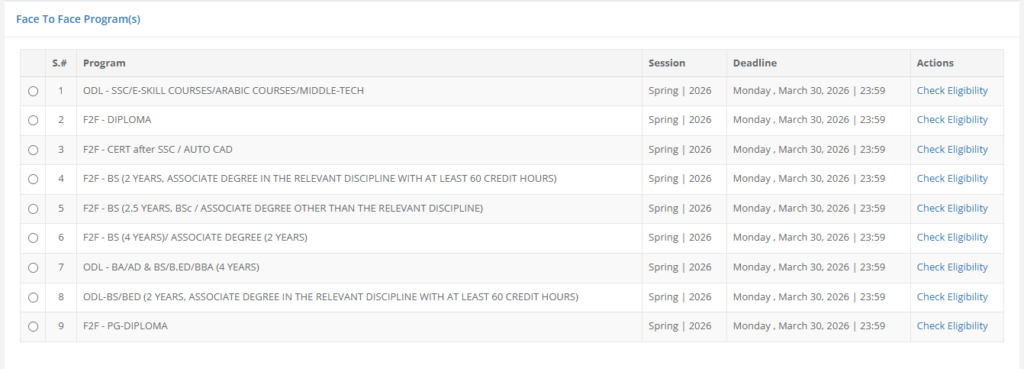
For Face to Face Programs, you’ll see:
| S.# | Program Name | Session | Deadline | Action |
|---|---|---|---|---|
| 1 | F2F – DIPLOMA | Spring 2026 | March 30, 2026 | Check Eligibility |
| 2 | F2F – BS (4 YEARS) | Spring 2026 | March 30, 2026 | Check Eligibility |
| 3 | F2F – PG-DIPLOMA | Spring 2026 | March 30, 2026 | Check Eligibility |
Don’t worry if you see “ODL” programs listed under Face to Face category – the system sometimes groups them together. Focus on finding your desired program.
Click “Check Eligibility” next to your chosen program category.
Step 6: Verify Your Eligibility
This step prevents wasted effort. AIOU wants you to confirm you qualify before filling lengthy forms.
After clicking “Check Eligibility,” you’ll land on a page with a dropdown menu labeled “Select a program.”
For example, choosing “ODL – BA/AD & BS/B.ED/BBA (4 YEARS)” reveals specific programs like:
- B.A GEN.(A.D. IN ARTS) (0475)
- Other specialized programs
Select your desired program from the dropdown. A detailed table appears showing all acceptable previous qualifications.
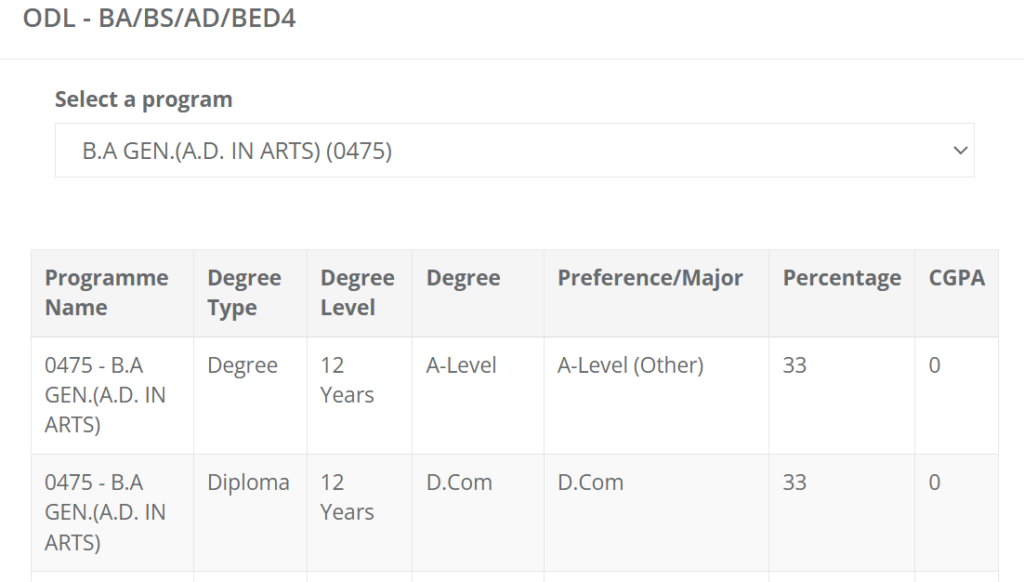
Example Eligibility Table for BA Program:
| Programme Name | Degree Type | Degree Level | Degree | Preference/Major | Required Percentage |
|---|---|---|---|---|---|
| 0475 – B.A GEN. | Degree | 12 Years | A-Level | A-Level (Other) | 33% |
| 0475 – B.A GEN. | Diploma | 12 Years | D.Com | D.Com | 33% |
| 0475 – B.A GEN. | Degree | 12 Years | A-Level | A-Level (Chemistry) | 33% |
How to Read This Table:
- Degree Type: Format of your previous qualification
- Degree Level: Duration of study (10 years = Matric, 12 years = Intermediate)
- Degree: Exact name of your previous certificate
- Preference/Major: Your subject specialization
- Required Percentage: Minimum marks needed (usually 33% for most programs)
If your previous education matches any row, congratulations – you’re eligible. Click the program name to proceed.
Step 7: Open Your Application Form
You’ll now see the “My Applications” page showing your newly created application:
| Tracking ID | Session | Program | Apply Date | Status | Actions |
|---|---|---|---|---|---|
| 02-2026-2-04198570 | Spring 2026 | Program Name | March 16, 2026 | Not Submitted | Open |
Write down your Tracking ID. This number is your application’s fingerprint. You’ll need it for future correspondence with the university.
Click the “Open” button in the Actions column. Your online admission form loads.

Step 8: Complete Personal Information Section
The first form section asks for basic personal details. Fill carefully:
| Field | Instructions |
|---|---|
| Full Name | Write exactly as on your Matric certificate |
| Father’s Name | Complete name as per official records |
| Date of Birth | Match your CNIC/B-Form exactly |
| CNIC/B-Form Number | Without dashes, just numbers |
| Gender | Select from dropdown |
| Nationality | Pakistani (unless otherwise) |
| Domicile | Select your province/district |
| Mobile Number | Triple-check this – all SMS updates arrive here |
| Email Address | Use a regularly checked account |
Pro Tip: Name mismatches cause major headaches later. If your educational certificates show “Muhammad Ali” but your CNIC says “Ali Muhammad,” use the version on your educational documents for admission and explain later.
Click “Save & Complete Section” when finished.
Step 9: Fill Academic Record (Crucial Section)
This section determines your eligibility. Take your time and be accurate.
Form Fields Explained:
| Field | What to Enter |
|---|---|
| Degree Type | Degree / Diploma / Certificate |
| Degree Level | 10 Years (Matric), 12 Years (FA/FSc), 14 Years (BA/BSc) |
| Degree | Matric Science, FA General, BA, etc. |
| Preference/Major | Your main subject (Biology, Economics, Islamiat) |
| Board/University | Your board name (FBISE, BISE Lahore, Karachi Board) |
| Starting Year | Year you began this degree |
| Passing Year | Year you passed |
| Roll Number | Exactly as on marksheet |
| Exam Type | Annual / Supplementary / Private |
| Grading System | Percentage (for Pakistani boards) or CGPA |
| Total Marks | e.g., 1100 for Matric |
| Obtained Marks | Your actual marks |
Example for Matric Student:
- Degree Type: Degree
- Degree Level: 10 Years
- Degree: Matric Science
- Preference/Major: Biology
- Board: FBISE
- Passing Year: 2020
- Total Marks: 1100
- Obtained Marks: 850
Important: If you have multiple degrees (Matric AND Intermediate), look for an “Add More” button to include all qualifications. The system needs your complete educational history.
After entering everything correctly, click “Save & Complete Section”.
Step 10: Upload Photograph and Documents
This step requires scanned copies ready on your device.
Required Uploads:
- Passport-size photograph
- Blue background only
- Recent photo (within 6 months)
- JPG format, under 2MB
- Professional quality – no selfies
- CNIC or B-Form
- Front and back scanned together or separately
- Clear, readable text
- PDF or JPG format
- Educational certificates
- Most recent degree first
- Clear scans showing all details
- Domicile certificate (if applicable)
Upload Tips:
- Use a scanning app on your phone for best quality
- Name files clearly (e.g., “CNIC_Front.jpg”)
- Check file size before uploading
After all uploads complete, click “Save & Complete Section”.
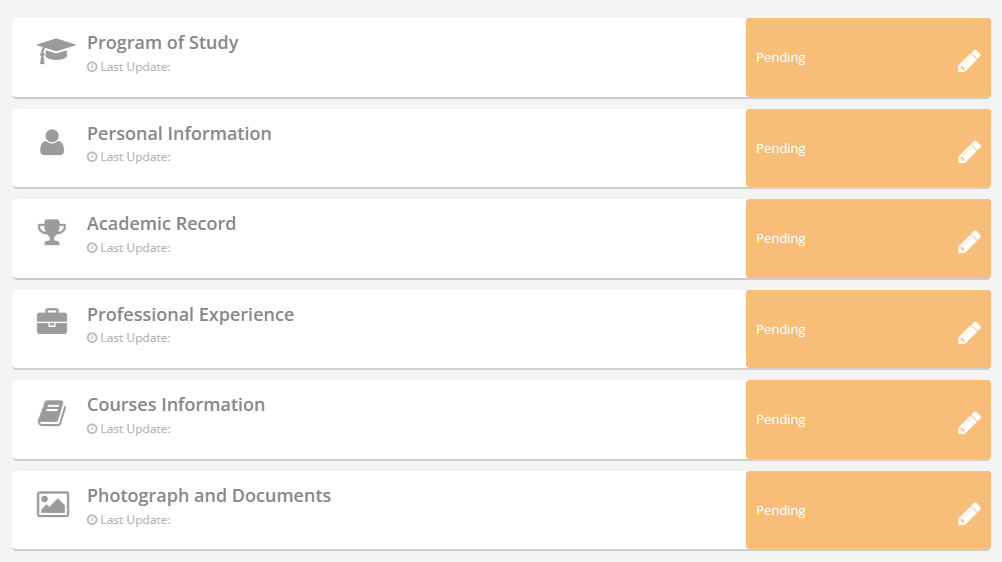
Step 11: Complete Additional Sections
Depending on your chosen program, you may see:
Professional Experience Section
- Required for B.Ed and certain programs
- Enter job titles, organizations, durations
- Upload experience certificates if needed
Courses Information Section
- For programs requiring subject selection
- Choose your optional subjects carefully
- Some subjects have limited seats
Complete all visible sections until every box shows a recent “Last Update” date.
Step 12: Review Everything Before Submission
This is your final chance to catch mistakes. Review each section:
- ✅ Full name spelling matches certificates
- ✅ Father’s name correct
- ✅ Mobile number verified
- ✅ Email address correct
- ✅ Date of birth accurate
- ✅ Program name matches your intention
- ✅ Educational details match certificates
- ✅ All documents uploaded clearly
The system shows completion status:
- Personal Information – Last Update: Today’s Date
- Academic Record – Last Update: Today’s Date
- Photograph and Documents – Last Update: Today’s Date
Everything should show today’s date.
Step 13: Accept Undertaking and Submit
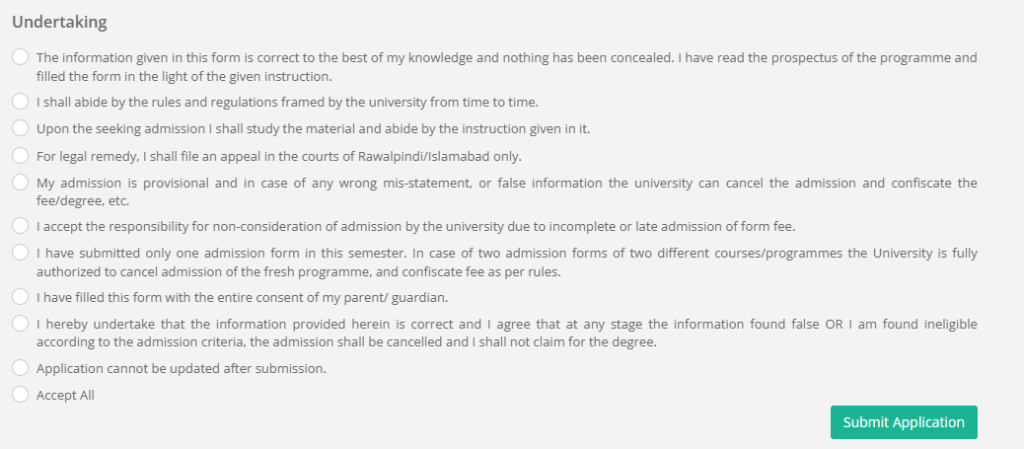
The Undertaking page displays legal declarations. Read each point carefully:
- Information provided is correct to my knowledge
- I will follow university rules and regulations
- Legal matters subject to Rawalpindi/Islamabad jurisdiction only
- Admission is provisional and cancellable if information false
- I accept responsibility for incomplete/late applications
- Only one admission form submitted this semester
- Form filled with parent/guardian consent
- False information leads to admission cancellation
- No updates possible after submission
Check the “Accept All” box after reading.
Now look at the summary box showing:
- Student Name
- Father’s Name
- Phone Number
- Email Address
- Program Applied For
Triple-check these one last time.
Click “Submit Application”.
Remember: After this click, you cannot edit anything. Make absolutely sure.
Step 14: Pay Your Admission Fee
After submission, a fee challan generates automatically. You have several payment options:
Method 1: Bank Branch Payment
Visit any branch of:
- Allied Bank (ABL)
- Muslim Commercial Bank (MCB)
- United Bank Limited (UBL)
- First Women Bank (FWBL)
Take your printed challan and pay the fee. Keep the receipt with stamp.
Method 2: Easypaisa App
- Open Easypaisa app
- Select “Bill Payments”
- Choose “Education”
- Find “Allama Iqbal Open University”
- Enter challan number
- Confirm and pay
Method 3: JazzCash App
- Open JazzCash app
- Select “Universities” under Education
- Choose AIOU
- Enter challan number
- Complete payment
Method 4: For Overseas Students
Visit olpay.aiou.edu.pk
Enter challan number
Pay with credit/debit card
Important Payment Notes:
- No IBFT or RAAST transfers accepted
- If challan doesn’t appear in bank system, wait one hour
- Always download the most recent challan from submitted status
Step 15: Track Your Application Status
After payment, regularly check your application:
- Log in to https://fmbp.aiou.edu.pk/application/index.php
- Click “Applied Program(s)”
- Check the status column
Status Meanings:
- Not Submitted: You haven’t submitted yet
- Submitted: Form submitted, waiting for processing
- Under Review: University examining your documents
- Approved: Admission confirmed – congratulations!
- Objection: Something needs correction
If you see “Objection,” click Open immediately, fix the issue, and resubmit. Delays can cancel your admission .
Confirmation Timeline:
- Online applicants: SMS confirmation within 15 working days
- Manual applicants: SMS confirmation within 25 working days
What Happens After Admission?
Books Delivery
Within 45 days of confirmation, you’ll receive study books at your postal address . If books don’t arrive, download soft copies from the AIOU website.
LMS Access
You’ll receive login credentials for AAGHI LMS (aaghi.aiou.edu.pk) via SMS. This platform contains:
- Online study resources
- Assignment submission portal
- Workshop schedules
- Exam announcements
Assignment Submission
Your grade divides as:
- 30% from assignments (submit during semester)
- 70% from final exams
Never skip assignments – they’re guaranteed marks and often contain direct questions from your textbooks .
Workshops
Some programs require attending workshops at regional centers. You’ll receive SMS notifications with dates and venues.
Programs Offered Spring 2026
Matriculation Level:
- Matric (General Group)
- Matric (Science Group)
- Matric (Dars-e-Nizami)
Intermediate Level:
- FA (General)
- FA (Dars-e-Nizami)
- I.Com
Bachelor’s Level:
- BA (Associate Degree in Arts)
- BS Programs (various subjects)
- BBA (Business Administration)
Teacher Training:
- Associate Degree in Education (ADE)
- B.Ed (1.5 Years)
- B.Ed (2.5 Years)
- B.Ed (4 Years)
Master’s Level:
- MA / MSc in multiple disciplines
- M.Ed
- M.Phil Programs
PhD Programs:
Various research disciplines
Common Application Mistakes to Avoid
Name Mismatch
Using different names on form and certificates creates verification problems. Stay consistent .
Blurry Documents
Upload clear scans. If officers can’t read your documents, they’ll raise objections .
Wrong Program Selection
Double-check program codes. BA (0475) is different from BS programs .
Last-Minute Rush
Servers get slow on deadline days. Apply at least one week early .
Incorrect Marks
Recalculate your total and obtained marks before entering. Simple math errors cause rejections .
Ignoring Objections
Check your application status weekly. Unresolved objections lead to cancelled admissions .
Frequently Asked Questions
Q: What’s the last date for AIOU Spring 2026 admission?
A: For most programs, February 10, 2026. PhD programs close February 17, 2026 .
Q: Can I apply without a computer?
A: Yes. Visit any AIOU regional campus – they provide free computers and internet for students .
Q: What’s the minimum age for Matric?
A: 13 years on admission date .
Q: Is there an age limit for other programs?
A: No upper age limit exists .
Q: How do I get my books?
A: AIOU sends books to your postal address within 45 days of confirmed admission .
Q: Can overseas Pakistanis apply?
A: Absolutely. Use olpay.aiou.edu.pk for fee payment .
Q: What if I make a mistake after submission?
A: Contact support immediately. After submission, you cannot edit .
Q: How will I know my admission is confirmed?
A: You’ll receive SMS and email confirmation within 15-25 working days .
Q: Can I apply for two programs simultaneously?
A: No. Submit only one form. Multiple applications lead to cancellation .
Need Help? Contact Information
Website: support.aiou.edu.pk
Phone: 051-111 112 468
Email: support@aiou.edu.pk
Regional Offices: 53 centers across Pakistan with student facilitation services
Final Thoughts: Take the Leap
Education changes everything. It changes how you see yourself, how others see you, and what you believe is possible.
AIOU has removed every barrier – age, location, money, time. The only thing standing between you and that degree is a decision.
The Spring 2026 window is open now. February 10 is approaching faster than you think.
Visit https://fmbp.aiou.edu.pk/application/index.php today.
Fill that form.
Pay that fee.
And six months from now, when you receive your first semester books at your doorstep, you’ll look back at today as the day everything changed.
Your future self is waiting.
Last updated: March 2026 for AIOU Spring Semester Admissions. Information verified from official sources, but always check the university website for real-time updates.